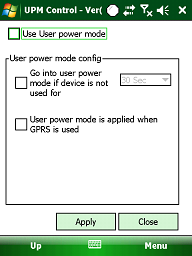
User Power Mode(LCD, Touch and keypad disable instead of sleep mode)
M3 Green and T
Modify registry by using M3.ini as below.
Example for M3T
// Type - 0:MC6300S, 1:MC6400S, 2:MC6500S, 3:MC6100S, 4:MC6700S, 5:MC8800S
// Scanner - 0:Opticon Scanner, 1:Symbol scanner, 2: Intermec scanner, 3: HHP Scanner
// Display OFF Mode(M3Green Only) -0:Default, 1: shot(sleep), long(display off), 2: shot(display off), long(sleep)
[DEVICE_TYPE]
Type=4
Scanner=0
LCDMode=2
M3 Orange
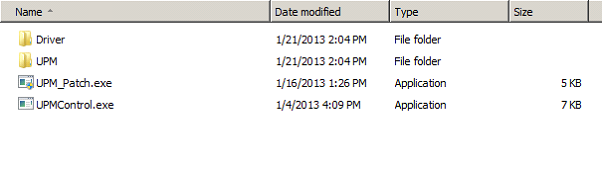
Please copy OrangeUPM and unzip on you PC firstly.(Based on English ver. OS)
i. ORANGE_UPM_20130116.zip contains mc_upm.dll, zylonite_pwrbutton.dll, zylonite_keypad_Us.dll, touch.dll, UPM_bug.exe and UPMControl.exe.
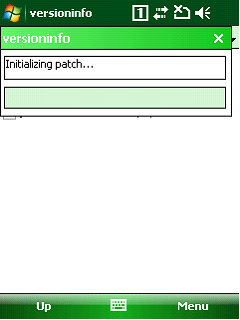
ii. Please copy the All files to Flash Disk folder and Run UPM_Patch.exe then ‘Please reset’ message showed up, perform the soft-reset.
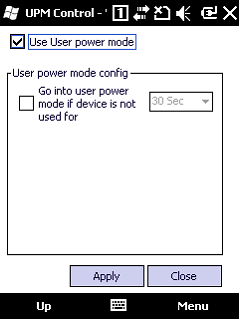
iii. Run the UPMControl.exe file on the device.
iv. Depending on the OS type of language, the ‘zylonite_keypad_xx.dll’ file needs to be replaced. (Language pack)
This file could be copied on Windows XP based.
If having any trouble with this, please request on itc page.
M3 SKY
i. Each type of files contain Patch.exe, patch.data and patchInfo.data.
ii. Please copy the All files to Flash Disk folder and Run Patch.exe then below process activated.
iii. Soft-reset is performed the below registry value’s created automatically.
[HKEY_LOCAL_MACHINE\Software\Mobilecompia] "EnableUPM"=dword:0
Please change the value as ‘1’.
MM3
Please copy MM3UPM unzip on you PC firstly.
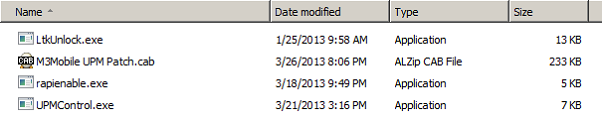
i. UPM_Patch_MM3.zip contains LtkUnlock.exe, rapienable.exe, M3Mobile UPM Patch.exe and UPMControl.exe as below.
ii. Run LtkUnlock.exe then question message shown up, select ‘OK’.
iii. Run rapienable.exe, nothing happens.
iv. Install M3Mobile UPM Patch.cab then soft-reset triggered automatically.
v. Launch UPMControl.exe program and check ‘Use User Power Mode’ then click apply.
è Close the program, UPM model already applied.
è This affects below registry value.
[HKEY_LOCAL_MACHINE\Software\Mobilecompia\CustomPowerMode] “UserIdleModeOn” 0(disable)/ 1(enable).
M3 SMART/ORP/ORS/ORC(OX-10P/S/C)/UL10
Simply modify the registry value as below.
[HKLocalMachine\system\M3Mobile\PowerButtonUPMMode] 0->1